Virtual account has become one of the most widely used payment methods for businesses, educational institutions, marketplaces, and digital service providers. With this method, customers can make payments using a dedicated account number directly linked to a specific bill or transaction.
One of the banks providing this payment method is Bank Syariah Indonesia, or BSI. Through a BSI virtual account, users can pay bills more practically without needing to manually confirm their payments.
So, what is a BSI virtual account, how do you pay through it, and what are the benefits for both customers and businesses? Read the full explanation below.
What Is a BSI Virtual Account?
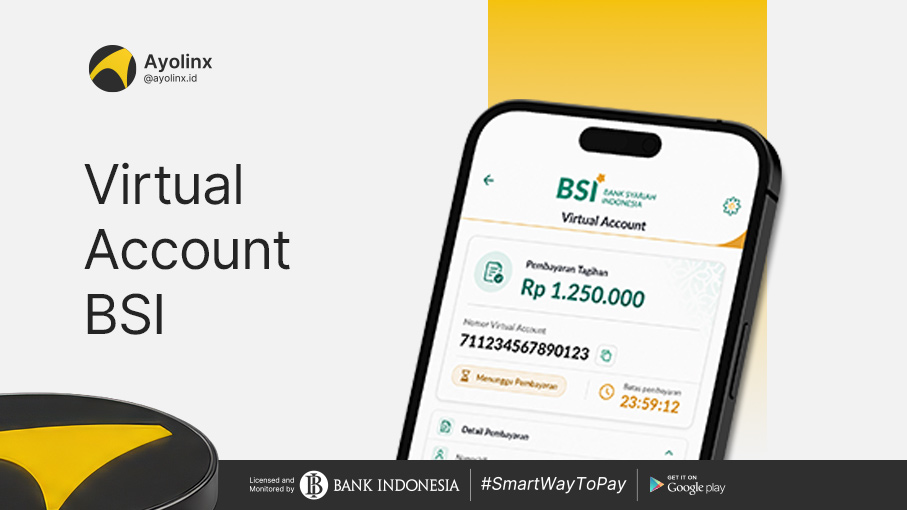
A BSI virtual account is a virtual account number used as a payment destination for specific transactions. This number is typically provided by a company, marketplace, school, university, institution, or service provider after a customer places an order or receives a bill.
Unlike a regular account number, a virtual account number is generally linked to transaction information such as:
- Customer name
- Order number
- Payment amount
- Type of bill
- Payment deadline
Because this information is already stored in the system, payments can be identified automatically. Customers no longer need to send transfer proofs to sellers or service providers.
For corporate needs, BSI also offers virtual account services affiliated with corporate current or savings accounts. Transaction balances can be consolidated into a master account, centralizing the management of incoming funds.
Functions of a BSI Virtual Account
Generally, a BSI virtual account functions as a tool to receive and identify payments from customers.
When a customer makes a payment using a virtual account number, the system matches the transaction with the stored billing data. Once the payment is successful, the transaction status updates automatically.
A BSI virtual account can be used for various needs, including:
- Online shopping payments
- Utility and service bill payments
- Travel ticket payments
- Education fee payments
- Membership fee payments
- Product order payments
- Customer fund collection
- Corporate transaction management
Its usage helps reduce the risk of recording errors because every transaction has a clearer payment identity.
Also Read: Here Are The Virtual Account Codes For Funds From All Banks
How Does a BSI Virtual Account Work?
The workflow of a BSI virtual account begins when a customer selects BSI as the payment method during a transaction. Here is an overview of the process:
-
Customer creates a transaction
The customer places a product order, registers for a service, or receives a bill from a company or institution.
-
System generates a virtual account number
After selecting BSI as the payment method, the system displays a BSI virtual account number to be used for payment. This number can be generated specifically for each customer or each transaction, depending on the service provider's system.
-
Customer makes the payment
The customer inputs the virtual account number through available payment channels, such as the BYOND by BSI application.
-
System validates the bill
Once the number is entered, the system displays transaction information. Customers can check the recipient's name, bill amount, and other details before proceeding with the payment.
-
Payment is automatically verified
After a successful transaction, the bank's system sends payment information to the company or service provider. The order status then updates to paid without requiring the customer to manually upload a transfer receipt.
How to Pay a BSI Virtual Account via BYOND by BSI
BSI customers can make virtual account payments through the BYOND by BSI application. This application is Bank Syariah Indonesia's digital service used to access accounts and perform various banking transactions.
Here are the steps to pay a BSI virtual account via BYOND by BSI:
- Open the BYOND by BSI application.
- Log in to your account using your registered credentials.
- Select the Pay & Buy (Bayar & Beli) menu.
- Select the Virtual Account menu.
- Enter the BSI virtual account number provided by the merchant or service provider.
- Tap the Continue button.
- Review the recipient's name, bill amount, and transaction details.
- Select Confirm if all information is correct.
- Enter your BYOND by BSI PIN.
- Wait for the notification indicating that the transaction was successful.
Save the transaction receipt if needed for future reference. However, on integrated systems, payments are usually verified automatically.
How to Get a BSI Virtual Account Number
A BSI virtual account number is not created by the customer independently through banking apps; it is typically issued by the company or institution receiving the payment.
To obtain one, customers can follow these steps:
- Select the product or service you wish to purchase.
- Proceed to the checkout or payment page.
- Choose the bank transfer or virtual account payment method.
- Select Bank Syariah Indonesia (BSI).
- Confirm the order.
- Copy the generated virtual account number.
- Make the payment before the deadline expires.
The virtual account number may appear on the payment page, invoice, email, merchant application, or in messages sent by the service provider. Before paying, ensure the number comes from an official source and matches your transaction.
Is a BSI Virtual Account Number the Same as a BSI Bank Code?
A BSI virtual account number is different from the BSI bank code. The Bank Syariah Indonesia bank code is 451, which is used to identify BSI when users make interbank transfers through specific channels.
Meanwhile, a virtual account number is a dedicated payment number provided by a merchant, company, or institution. This number may contain specific codes tailored to the service provider's system.
Therefore, users should follow the payment instructions displayed on the app or invoice. Do not add the bank code directly to the virtual account number unless explicitly requested in the payment instructions.
Example of BSI Virtual Account Usage
For instance, a customer purchases an online store product with a total payment of IDR 350,000. On the checkout page, the customer selects the BSI virtual account method. The system then generates a payment number, for example: 8808XXXXXXXXXXXX
The customer opens the BYOND by BSI application, selects the Virtual Account menu, and enters that number. The system will display the merchant's name and a total bill of IDR 350,000.
The customer opens the BYOND by BSI application, selects the Virtual Account menu, and enters that number. The system will display the merchant's name and a total bill of IDR 350,000. (Note: The number above is for illustration only. Actual virtual account formats may vary across different companies or transactions.)
Benefits of BSI Virtual Accounts for Customers
Using a virtual account provides several advantages for customers:
- More practical payments: Customers simply enter the provided virtual account number without needing to search for or type out the company's regular account number manually.
- Bill information verification: Before making a payment, users can usually view billing details, ensuring funds are sent to the correct transaction.
- No need to send transfer proofs: On integrated systems, payments are verified automatically, eliminating the need to contact merchants just to send proof of payment.
- Versatile usage: BSI virtual accounts can be used to pay for online shopping, digital services, tickets, education, and other needs as long as the service provider supports BSI.
- Faster processing: Automatic identification updates payment statuses much faster than manual transfers, which require individual verification.
Benefits of BSI Virtual Accounts for Businesses
Beyond helping customers, BSI virtual accounts offer great advantages for companies:
- Simplified transaction reconciliation: Every payment can be linked to a specific customer or invoice, sparing finance teams from matching account statements with manual transfer receipts.
- Reduced recording errors: Virtual account numbers help companies identify payment origins and destinations more accurately.
- Faster payment confirmation: Systems instantly receive notifications upon successful payment, allowing orders or services to be processed much quicker.
- Enhanced customer convenience: Customers get a practical and familiar payment method. Offering more payment options helps customers complete transactions more smoothly.
- Support for high-volume transactions: Businesses with high transaction volumes can use virtual accounts to manage payments from numerous customers in a structured manner.
Causes of BSI Virtual Account Payment Failures
Although the process is relatively straightforward, BSI virtual account payments can still encounter issues. Check the following potential causes:
- Incorrect virtual account number: A single digit error can cause the number to be unrecognized. Copy the number directly from the payment page to minimize input errors.
- Expired payment number: Some virtual accounts have a payment deadline. Once passed, the number becomes inactive.
- Insufficient balance: Ensure your account balance is enough to cover the bill and any applicable transaction fees.
- Mismatched amount: For certain virtual account types, customers must pay the exact listed amount. Payments with different amounts may be rejected or left unidentified.
- System or network disruptions: Transactions may be delayed if there are issues within the app, internet network, bank system, or merchant system.
- Transaction limit reached: Payments can also fail if the transaction amount exceeds the daily limit of your account or payment channel.
If your balance has been deducted but the order status has not updated, save your transaction receipt and contact the service provider or official BSI channels for verification.
Also Read: BNI Virtual Account: How to Pay, Codes, and Admin Fees
Conclusion
A virtual account is a virtual account number connected to specific customers or transactions. This method serves various needs, ranging from online shopping, utility bills, education fees, ticket purchases, to other business transactions.
Customers can pay their BSI Virtual Accounts via the BYOND by BSI application by selecting the Pay & Buy menu, opening the Virtual Account option, entering the payment number, and reviewing and confirming the transaction details.
For customers, virtual accounts make payments faster, easier, and more practical. For businesses, this method accelerates payment identification, reduces manual reconciliation, and simplifies transaction monitoring.
It is time to deliver a more practical payment experience to your customers. Use Ayolinx Payment Gateway to provide BSI Virtual Accounts and various other payment methods through a single integration. With a centralized payment system, businesses can manage transactions more efficiently and focus on driving sales growth.